
Release notes
Admin UI
26.9.1
07 Sep 2026What's new
- MT5 symbol import now sets the Maximum Price Filter to the system default (1 000 000) when the MT5
PriceLimitMaxis 0, instead of importing 0. - Liquidity connectors now expose the optional Order Execution Timeout session parameter (milliseconds, 1..3600000), including a new column in the connectors grid.
-
The SL/TP cells of open positions and working orders turn orange when they are within 10 pips of the live market price and red when they are within 5 pips.

Misc
- The grids on the 'Trade History', 'Order History', 'Cash Transfers' and 'Charts' pages now default to displaying a one-month date range (the same calendar day as today, but one month ago). This was done to speed up the initial loading time for pages with a large amount of data.
26.8.2
20 Aug 2026What's new
-
Liquidity connector forms now support the
Usernamesession parameter and the CENTROID-FIX-QUOTES/CENTROID-FIX-TRADES connector types.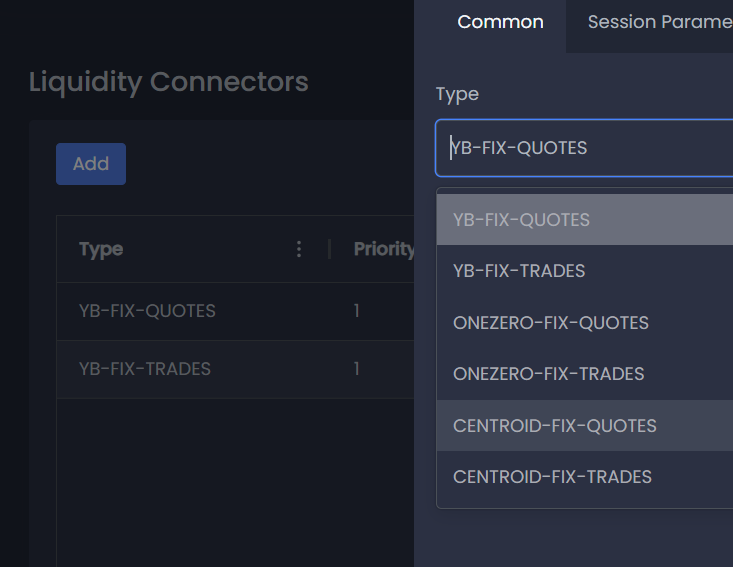
- We also improved the Symbol migration process from MT5. Now the form contains clear and sequential steps, where it is obvious what needs to be done at each stage.
26.8.1
12 Aug 2026What's new
-
We have added a 'Margin Calls' dashboard widget with live updates, as well as a 'View Positions' option in the context menu that opens the Account Overview on the 'Positions' tab.

-
The Symbol Mask feature in Groups->Commissions, Groups->Symbols and Holidays now offers live search results: plain text lists of matching symbols and a mask preview showing exactly what will be selected. Masks that pin a full symbol path now match correctly, rather than applying the wrong symbol profile to order-form limits.

Bug fixes
-
Cash Transfers in Admin Portal now record the time they are submitted instead of date when users open the form and start the transfer flow.
26.7.4
31 Jul 2026What's new
-
The Journals page has been added to the Admin UI, allowing you to search through the server log. This feature is only available to managers with the View Logs permission.

26.7.3
30 Jul 2026What's new
-
Order Routing rules can now filter by manager login IDs (
By Manager Login Id).
26.7.2
26 Jul 2026What's new
- Market Depth (DOM) redesign — the order book widget got a UI/UX overhaul: a new toolbar, a single scrollable view, text-based Bid/Ask/Both buttons, a recenter control, and volume bars capped so they never overwhelm the row.

- Bigger, more resilient lists — Trading Accounts, Clients, Symbols, Groups, and Open Positions now fetch more results per page, matching the API's higher limits. The WebSocket connection also tolerates slower responses without dropping, and lists that hit a stale pagination token retry more times before giving up.
- Reversed Position Id — Trade History, Trades Report, and Trade Details now show the Reversed Position Id for trades that closed a position via a reversal.

- Server API level check on sign-in — the Admin Panel and Web Trader now verify they're connecting to the right kind of server, showing a clear error if Admin Panel is pointed at a client API server (or vice versa) instead of a confusing downstream failure.
- Safer position and order actions — dangerous actions like Delete (positions) and Force Delete (orders) have been moved into a dedicated menu, separated from routine actions like Edit and Close, with clearer confirmation warnings.

- Request tracing headers — every request from Admin and Terminal now carries additional tracing headers to help with diagnostics.
- Auto-generated passwords — Trading Accounts now has a one-click option to generate a secure password when setting or changing account credentials.

- Industry Tag for symbols — symbols can now carry an optional Industry Tag, visible in the symbols grid, symbol overview, and edit form, with autocomplete suggestions drawn from tags already in use.

- Client External ID in Trading Accounts — the Trading Accounts list now shows each linked client's external ID.

- Server time zone support — Admin and Terminal now render timestamps using the server's time zone, user settings show time zone as read-only, and the UI falls back safely to UTC if the server's time zone is missing or invalid.

Bug fixes
- Fixed the Close By order type in the place-order form: selecting a position no longer triggers validation errors, and the Position by Id dropdown now populates correctly.
- Fixed Symbol Settings forms silently converting very large numbers into scientific notation, which caused backend validation failures. The UI now shows a clear validation error when a value exceeds the safe integer range, and Minimum Price Filter can no longer exceed Maximum Price Filter.
26.7.1
08 Jul 2026What's new
- Improved MT5 migration flow in the Groups page, with better status indicators (Ready / Blocked), expandable error details, and blocking validation for missing required fields.
- MT5 Trading Account migration now reads the Client column from the CSV and stores it as
clientExternalIdon the created client record. - Monetary values in data grids are now colored green when positive and red when negative. All price and money columns are right-aligned in a monospace font for easier scanning.
- WebSocket connections now retry indefinitely with capped exponential backoff (~2–32s with ±20% jitter) instead of stopping after 3 attempts. Token refresh is also synced and the WebSocket module now picks up the updated token after a
/refreshfor all subsequent messages. - Auto-logout error message text and styling have been updated. Now it contains the real reason of logout.
- Login screens now show product-specific headings: "Admin Portal" for the admin app and "Web Trader" for the terminal.
Bug fixes
- Fixed a bug where client initials were not displaying correctly in the user avatar component, which caused an error in the UI.
- Stop Limit orders in the Admin UI can now be placed and modified with Limit Price on either side of Stop Price, matching actual API behaviour.
- Fixed a duplicated column name appearing in the Order Routing Rules grid.
- Fixed a validation error that incorrectly blocked cloning a Manager group (
Managers/…) into a group with a non-manager name (and vice versa).
26.6.4
18 Jun 2026What's new
- Percentage inputs added for commission and margin fields across Symbols, Groups, Commission Tiers, and Order Routing Rules - values are entered and displayed as percentages, with the decimal equivalent sent to the API automatically.
- The Groups page now shows an Id column in the table. The Group Overview drawer's Common tab also displays the group Id as a read-only field.
-
The Symbols Sessions tab now supports bulk editing, select multiple weekdays and apply the same quote/trade session schedule to all of them at once. The "Enable Separate Trading Sessions" checkbox has been replaced with a "Copy Quote Sessions" button.


-
A new Eligible for currency conversion checkbox has been added to the Symbol Currency tab. MT5 import automatically sets this flag for known FX pairs.

-
The Margin Calculation Mode and Profit Calculation Mode dropdowns in the symbol editor now show a short formula hint beneath each option while the list is open.

-
ExchangeStocks and ExchangeBonds are now available as margin calculation modes. When either is selected, the Price Corridor Threshold field becomes required.

Bug fixes
- Stop Loss and Take Profit fields no longer auto-fill with the current bid price on focus, they now start empty and require manual input.
- Order routing integer-only filter fields (By Spread, By Position Age, By Time Since Position Update, By Market Price Deviation) now correctly reject decimal values with a validation error.
- Quick search on the Managers and Trading Accounts pages now correctly filters server-side data.
- Pagination on large datasets no longer causes an infinite "Invalid nextToken" loop. The UI silently recovers on a stale cursor and only shows a retry prompt if the recovery also fails.
- Symbols with CFDINDEX or CFDLEVERAGE calculation modes now import correctly from MT5 — these modes previously caused the import to fail.
- Special characters (
&,<,>, quotes) in free-text fields (symbol description, commission profile description, holiday description, trading account comment, client comment) are now stored and displayed correctly without HTML entities leaking into the UI.
Misc
- Versions 26.6.1-26.6.3 are also included in this release.
26.5.7
28 May 2026Bug fixes
- During MT5 Group migration, symbol masks on group symbol profiles and commission profiles are now converted to Trade Server wildcard format correctly: backslashes become forward slashes, surrounding whitespace and leading/trailing slashes are removed, and wildcards (
*,!) are preserved. Symbol folder paths with a leading separator are normalized the same way. Masks and paths that previously came out malformed (and could match no symbol) now work!
26.5.6
26 May 2026What's new
- Added support for batch deletion of groups. Users can now select multiple groups and delete them in a single operation, with a confirmation grid showing the selected groups before deletion and detailed results for partial failures.
- Four new price-related fields (
"Market Price","Market Price (Markup)","Stop Price","Limit Price") was added to the Trade History page. - We have added validation for the order of actions on the Order Routing Rules page, which will indicate which actions can be included in Order Routing and in what order.
Bug fixes
- Few improvements for Place Order form. Now, in case of invalid data, even if the users did not interact with the form (for example, in case of TS misconfiguration), an error will be shown when trying to click on Sell or Buy.
26.5.5
18 May 2026Bug fixes
- We have fixed an issue in which the Open Position and Working Order detail drawers displayed stale data even though the underlying tables received live WebSocket updates. The views now remain synchronised with the grid in real time: market prices, P&L, order quantities, and other fields update as they change on the server.
Misc
-
We have added a 'Disabled' option to the 'Swap Mode' field in the group symbols lookup configurations.
26.5.4
14 May 2026What's new
- Force-Delete for Working Orders. Managers can now force-delete a working order independently of the standard cancel flow. The Working Orders grid now offers two distinct actions: Cancel (for standard order cancellation) and Delete (a dedicated single-order force-delete action). Access to force deletion is controlled by a new manager permission (
orderForceDelete), so only authorised managers will see and use it. -
Three-State Trade Options in Symbol Group Profiles. Settings now support three states instead of a binary checkbox: "Allow", "Disallow" and "Use defaults". This means an override no longer becomes permanent once set — you can clear it from the UI at any time and fall back to the symbol's default.

- Improved MT5 Group Import. MT5 group imports now correctly preserve the source server's margin and stop-out settings: Open Position Type (Netting / Hedged), Stopout Value Type (Percentage / Money) and Margin Call Value Type (Percentage / Money).
Bug fixes
- Zero Volumes Now Accepted on MT5 Symbol Import. MT5 symbol and group imports no longer fail when VolumeMin, VolumeMax, VolumeStep, or VolumeLimit are set to 0 — the imported entity keeps the literal 0 value. The Symbols and Symbol Group Profile edit forms also accept 0 for the same four fields.
26.5.3
13 May 2026What's new
- MT5 "default" inheritance: group-profile fields with
"default"source values are now correctly omitted from the imported profile. Instead, values from the Symbol settings will be used. - 8-decimal precision: order-size fields on both Symbol and Symbol Group Profile now reject values with more than 8 decimal places (API limitations).
Bug fixes
- MT5 symbol import: Min order size, Max order size, Order size increment, and Max position are now stored as lots (
Units / ContractSize) instead of raw MT5 units. - MT5 group migration: per-symbol order sizes in group profiles are converted to lots by looking up the lot size of the matching imported system symbol. Profiles whose mask cannot be resolved are flagged as invalid in the existing import-error UI.
26.5.2
12 May 2026What's new
- We've added more details to the API error message to make it easier for users to understand what's wrong.
26.5.1
11 May 2026What's new
- We improved the processing of the Symbol's path property in the MT5 migration module. Now path always end with
/, and the symbol name is stripped from the path end when present. - Also, we're added "sanitazer" for Symbols descriptions with special characters (
',<,>) in MT5 import module instead of displaying a migration error.
26.4.4
30 Apr 2026What's new
-
We have improved the process for migrating group data from MT5. Now, before migration, user can specify any missing data required by Trade Server, such as the "Email Service".

-
We have also 'relaxed' the validation rules during groups migration and now only display errors if it is completely unclear how the data should be migrated. For example, if the Group is missing at least one required symbol profile, or if the current "Range Mode" is not supported by the Trade Server.

-
A grouping option has been added to the Symbols tab on the Liquidity Connectors page to make it easier to select symbols by prefix in the path.

Misc
- The ability to modify the "defaultLeverage" property for groups has been removed because it is now deprecated in the API.
26.4.3
19 Apr 2026What's new
-
We have added a "Daily Change" column to the "Market Watch" widget on the dashboard. This shows the % daily price change in the market. This column is hidden by default, so you will need to enable it via the grid header context menu.

- A new “Trade History” tab has been added to the “Account Overview” section, providing a record of all transactions associated with the account.
-
We’ve introduced a feature that allows users to save login-server pairs in their browser alongside a custom description for easy identification. This removes the need to re-enter details each time. If you would prefer not to save a pair, simply leave the "Description" field blank.

26.4.2
11 Apr 2026What's new
-
We’ve added the ability to view trades for an open position. If you select “View trades” from the context menu, you’ll be redirected to the Trade History page with filters automatically applied to show only the trades for that position:

-
In the Working Order overview, we displayed the current SL/TP values. Furthermore, these values are now automatically populated in the Working Order editing form:

26.4.1
02 Apr 2026What's new
-
We've added the ability to close, edit, and delete an open position directly from the list of all open positions:

Bug fixes
- A bug has been fixed where the time zone selected in the User Settings for displaying dates in the UI was not taken into account, and the browser's time zone was used instead.
- We have fixed an issue where the lack of edit permissions prevented the preview of an entity (such as a Symbol) from opening, even if view permissions were granted.
- We have fixed an issue where the Contract Size value was being ignored during symbol import from MT5.
26.3.5
26 Mar 2026Bug fixes
- We have fixed a bug that prevented users from customizing the Market Depth widget's appearance.
26.3.4
25 Mar 2026Bug fixes
- We have resolved an issue with group import errors when Id and version are not empty. This usually occurs when clients migrate groups from one server to another.
26.3.3
24 Mar 2026What's new
-
We've added a new page, Access Tokens, where you can view and manage all access tokens for all accounts. Access tokens allow you to make API calls to Admin or Public APIs with the option to set a custom expiration time.

- We have included the Bid/Ask Low and High columns in the Market Watch widget for the current day.

Misc
- We’ve resolved several UI issues related to floating-point numbers.

26.3.2
14 Mar 2026What's new
- To prevent conflicts like self-blocking, we have disabled the ability to edit user own account via the import-export operation in Trading Accounts page.
Bug fixes
- The CSV export on the Order Routing page has been fixed.
26.3.1
07 Mar 2026What's new
- We have added a restriction to the UI for changing groups for trading accounts. Now, it is impossible for a manager account to select a non-manager group, and vice versa—it is impossible to assign a manager group to a non-manager account.
- We have added hints to the UI indicating which fields cannot be changed after creating an entity, even during the import/export process.
Bug fixes
- Fixed a bug where it was impossible to save data from the editing form if optional fields were cleared.
- Fixed a bug in Symbols migration from MetaTrader, when it was impossible to migrate a symbol with sessions starting on one day and ending on the next day.
26.2.3
22 Feb 2026What's new
- We have added a new type of widget for the Dashboard with summary information about open positions updated in real time.
- We have also replaced manual data updates ("Refresh" button) in the Cash/Assets Transfers page with automatic real-time updates.
Bug fixes
- Fixed a bug where the content of the iframe widget was not displayed in full-screen mode.
26.2.2
14 Feb 2026What's new
- We have added links to the API specification and user guide to the main menu.
26.1.9
08 Feb 2026What's new
- To sign requests for adding new entities or editing existing ones, we now use a secret string generated on the server, which has further improved the security of our application.
- We have improved the UX for selecting a group in the trading account add/edit form. Now only groups with similar configuration are displayed, which reduces the risk of incorrect configurations. Similar UX improvements have also been made to the Group add/edit form.
Bug fixes
- We have hidden the "Reports" section from the Main Menu if the user does not have permission to view these pages, so as not to show them the "Access denied" message.
26.1.8
04 Feb 2026Bug fixes
- Fixed the issue where it was impossible to save the Commission Profile changes in the group settings
26.1.7
04 Feb 2026Bug fixes
- Fixed "CSV injection" vulnerability in import-export feature
- Fixed "3rd party assets" vulnerability in the Dashboard iframe-widget
- Fixed missed
/logoutendpoint call if the user token has expired and/or cannot be renewed, to additionally notify the back-end that the user is no longer authorized